Send contracts for e-signature from your terminal. Ships a complete signing app (sign page, signed PDF with certificate, reminders, owner admin) you drop into your own Next.js + Supabase app or deploy fresh on Vercel. Drafts, previews and sends only on your yes.
contractse-signaturenextjssupabaseresendcli
CategoriesLGJ ExclusiveAutomationSales
See it in action
Documentation
# /esign
Your own e-signature system: a signer gets an emailed link, reads the contract, signs by typing or
drawing, and both sides get a signed PDF with an audit certificate. Contracts are drafted and sent
from this terminal; there is no per-envelope fee.
The app ships inside this skill at `~/.claude/skills/esign/app`. Setup copies it once. After that,
every command runs from the user's app folder as `npm run esign -- <subcommand>`. Every `src/...`
and `/api/...` path named below is a file or route in that bundled app. No Supabase? The fallback
is any Postgres plus S3-compatible storage, through Path A2.
## Step 0 — Prerequisites
Check these before anything else. Run the checks; do not assume.
| Requirement | Check | Where to get it |
|---|---|---|
| Node.js 20 or newer | `node --version` prints v20 or higher | https://nodejs.org |
| The bundled app | `ls "$HOME/.claude/skills/esign/app/package.json"` | Reinstall this skill |
| A Supabase project (or any Postgres plus S3-compatible storage) | The user can open the project's SQL editor | https://supabase.com/dashboard/sign-up (free plan is enough) |
| A Resend account with a verified sending domain | Resend dashboard, Domains, shows the domain as Verified | https://resend.com/signup |
| A host that runs a daily cron (Vercel, or your own) | The user has a deploy target | https://vercel.com/signup (Hobby plan is enough) |
| Setup finished (for anything except `setup`) | `npm run esign -- templates` in the app folder lists templates | `## Setup` below |
If anything is missing, STOP. Tell the user which row failed and where to get it. Do not write
placeholder commands, and do not run any subcommand until `templates` works.
## Route on `$ARGUMENTS`
- `setup`, or the last row of Step 0 fails: go to **Setup**.
- Starts with `status`: go to **Status**.
- Starts with `void`: go to **Void**.
- Anything else ("NDA for Sam at Acme"): go to **Draft and send**.
## Setup
First ask with `AskUserQuestion`: "Where should the signing system live?"
- **New app (Recommended for most people).** A separate small app on free Supabase and Vercel
accounts. Nothing in an existing site changes. Path B.
- **Inside my Next.js + Supabase app.** Copies the module into the user's repo. Path A1.
- **Inside an app on another stack.** Rails, Laravel, Django, Express and so on. Path A2.
### Path B: a new app
Follow `references/vercel-supabase-setup.md` step by step. In short:
1. Copy and install: `cp -R "$HOME/.claude/skills/esign/app" "<parent folder>/esign-app"`, then
`npm install` inside it.
2. Database: open the Supabase SQL editor, paste all of
`supabase/migrations/0001_contract_signing.sql` and run it. With the Supabase CLI linked to
the project, `supabase db push` does the same.
3. Environment: copy `.env.example` to `.env.local` and fill it in. The comments say where each
value comes from. Required: the three Supabase values, `RESEND_API_KEY`,
`CONTRACT_PUBLIC_BASE_URL`, `CONTRACT_OWNER_EMAIL` and `CRON_SECRET`. Also set
`ESIGN_FROM_EMAIL` to an address on the verified domain (the default only reaches the Resend
account's own address) and all four company values: `ESIGN_COMPANY_NAME`,
`ESIGN_COMPANY_ADDRESS`, `ESIGN_SIGNER_NAME`, `ESIGN_SIGNER_TITLE`. These four fill the company
fields of every contract. Never print the service role key or the Resend key into the chat.
4. Signature image (optional): a transparent PNG of the owner's signature at
`public/brand/signature.png`. Without it, the company signs with `ESIGN_SIGNER_NAME` in
italics. A logo is optional too (`ESIGN_LOGO_PATH`).
5. Deploy: push to a GitHub repo and import it in Vercel, or run `vercel` then `vercel --prod`.
Add the same variables in the Vercel project settings. Set `CONTRACT_PUBLIC_BASE_URL` to the
production URL, since every emailed link is built on it.
6. Cron: `vercel.json` already schedules the reminder job once a day (14:17 UTC). Vercel Hobby
runs crons once a day, which is enough for the day 2 and day 5 reminders and for expiring old
links.
7. Test with a contract addressed to the user's own email (see the end of this section).
### Path A1: an existing Next.js + Supabase app
1. Copy every file under `src/`, `scripts/`, `public/brand/` and `supabase/migrations/` from
`$HOME/.claude/skills/esign/app` into the user's repo at the same paths, except
`src/app/layout.tsx`, `src/app/page.tsx` and `src/app/globals.css`. Before copying, list every
file that already exists in their repo (shared helpers such as `src/lib/utils.ts`,
`src/lib/supabase/` and `src/components/ui/` often do, and so may `src/app/admin/`). Show the
list and ask how to handle each one; never overwrite.
2. Merge the `dependencies` and the `esign` script from the bundled `package.json` into theirs,
then `npm install`.
3. The code imports with the `@/` alias for `src/`. If their `tsconfig.json` has no such alias,
add it.
4. Then steps 2 to 7 of Path B. Add the cron entry from the bundled `vercel.json` to theirs.
### Path A2: another stack
Read `references/porting-other-stacks.md` with the user. The SQL is plain Postgres plus one
private storage bucket, and the bundled app is the spec: rebuild the same routes, keep the
security rules listed there, and reuse the templates unchanged. Port one route at a time and
test each against the bundled app's behaviour.
### Test before the first real contract
Draft `mutual-nda-v1` to the user's own address, send it, open the email, sign on a phone, and
confirm the signed PDF arrives at both the signer address and `CONTRACT_OWNER_EMAIL`. A signed
test cannot be deleted; it stays as a record. If anything fails, read
`references/troubleshooting.md`.
## Draft and send
Hard rules:
- Never run `send` without the user's explicit yes to the question in step 5, in this session.
A yes for one contract never covers another.
- Never print, paste or store a full signing link. It is the signer's credential. The CLI masks it
(`ctr_ab12…ef90`); relay only that form.
- Never invent a contract term. Fill only what the user said; ask for everything else.
- A draft is frozen. Any change after drafting means void it and draft again.
**1. Pick the template.** Run `npm run esign -- templates`. It prints each slug, version, default
party and the sender and signer fields. Default mapping: partner or NDA to `mutual-nda-v1`,
contractor or freelancer to `contractor-v1`, client to `client-services-v1`, unless the user
names another.
If the template body still starts with "Starter template. Have a lawyer licensed in your state
review it before you use it.", tell the user once that this line prints on the contract, and point
them to **Customising templates** to remove it after their lawyer's review.
**2. Collect the terms.** Sender fields come from the user. The four company fields that
`templates` marks "from brand" fill from the `ESIGN_COMPANY_*` and `ESIGN_SIGNER_*` variables
when left out of `--values`. A value the user gives wins. If those variables are unset, ask for the
company details rather than let a placeholder through. Signer fields (the signer's legal name and
address) are typed by the signer on the signing page; never ask the user for them. Missing the
signer's name or email, or any required sender field? Ask for exactly those, in one message.
**3. Draft.**
```bash
npm run esign -- draft --template <slug> --party client|partner|employee --name "<signer name>" --email <address> --values '<json>'
```
`<json>` maps field keys to values: `{"effective_date":"2026-11-01","governing_state":"Texas"}`.
Dates go in as `YYYY-MM-DD`. A `list` field takes a JSON array of strings, one per bullet, at most
15 items of 200 characters, no line breaks. If any value contains an apostrophe, write the JSON to
a file with the Write tool and pass it from a short Python `subprocess.run([...])` call instead, so
the shell never re-parses the quote.
Exit 2 prints `Missing sender fields:` and one key per line: ask the user for those and draft
again. Exit 1 is an error; quote it.
**4. Show the contract and the email.** Run `npm run esign -- preview <id>`. It writes a PDF
marked "DRAFT, not signed" to `drafts/` in the app folder and prints its full path. Open it for
the user (`open "<path>"` on macOS) and read back every section that holds a value they supplied,
plus the company name and signer, so a wrong value is caught now. Then run
`npm run esign -- email-preview <id>` and paste its whole output into the reply: the To line, the
subject and every line of the body. Say under it that the `…` link is shortened on purpose and will
not open; the real link goes out only with the send.
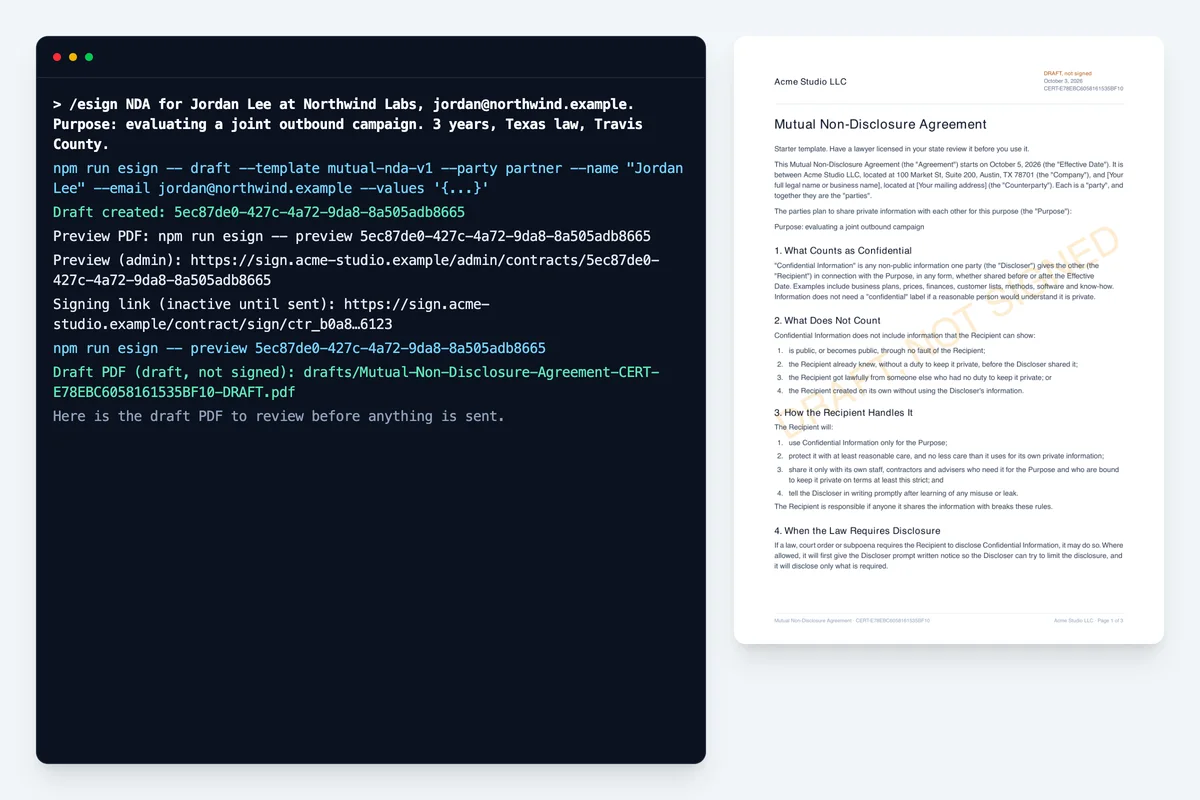
**5. Ask.** Above the question, a short card: template and version, party, signer name and email,
the link's expiry from the email. Then `AskUserQuestion`: "Send to <name> <email>?" with "Send"
(emails the link now; undo is `void`, which kills the link) and "Don't send" (keeps the draft;
nothing is emailed). Label neither one Recommended.
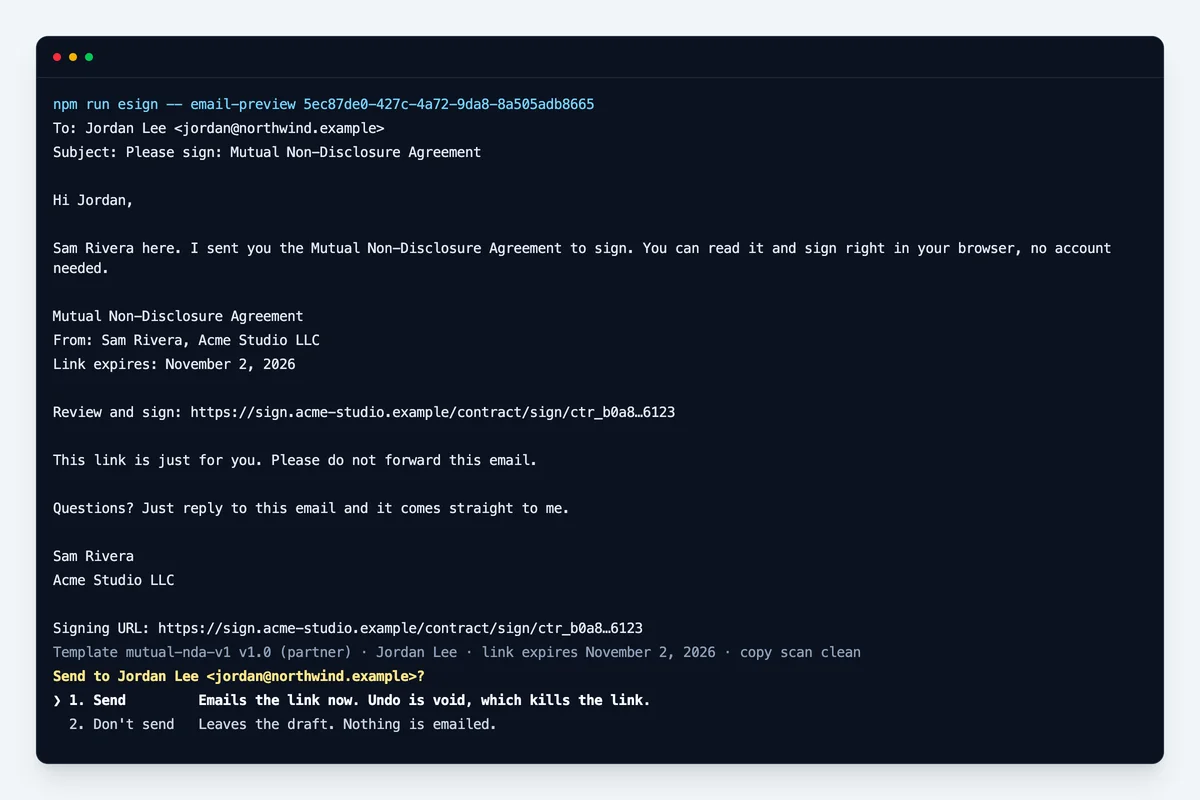
- On "Send", and only then: `npm run esign -- send <id> --confirm <id>`. Report the line it
prints. `Send failed:` means the contract went back to draft with the same link; say so and ask
before trying again.
- On anything else: send nothing. The contract stays a draft. Offer `/esign void <id>` once.
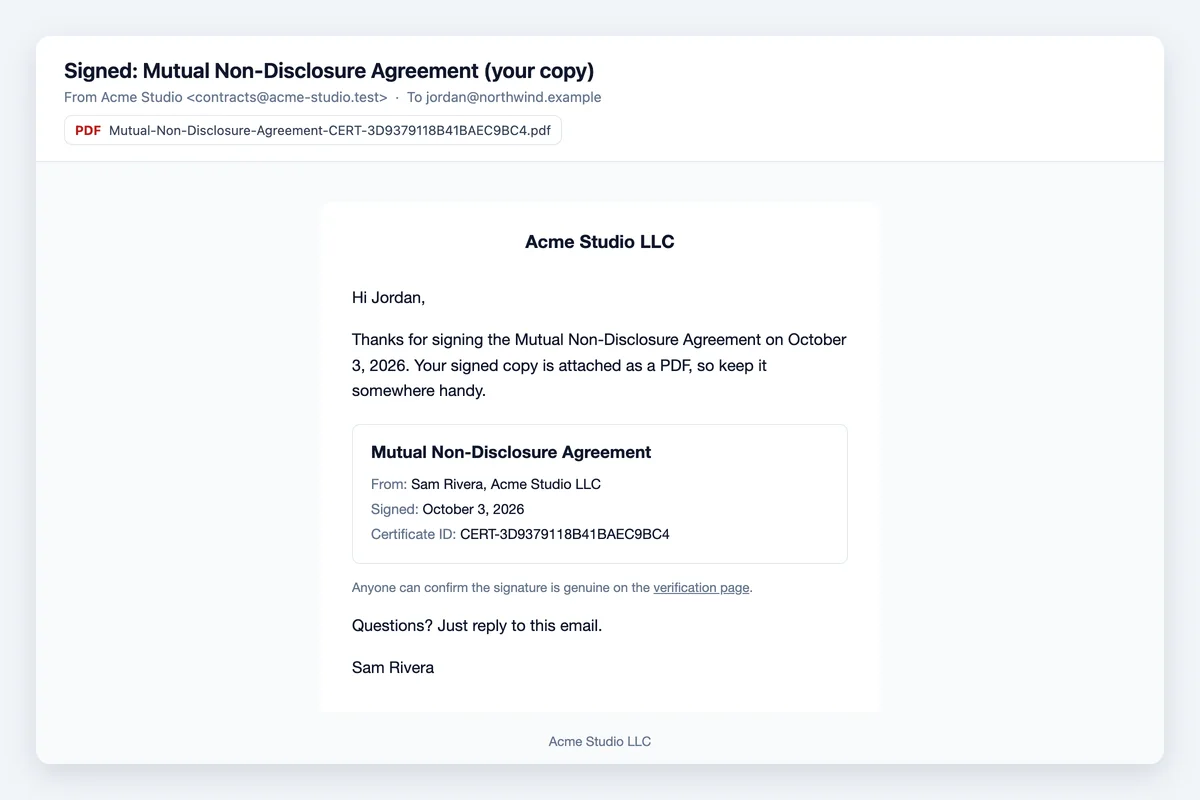
The signer gets this email:
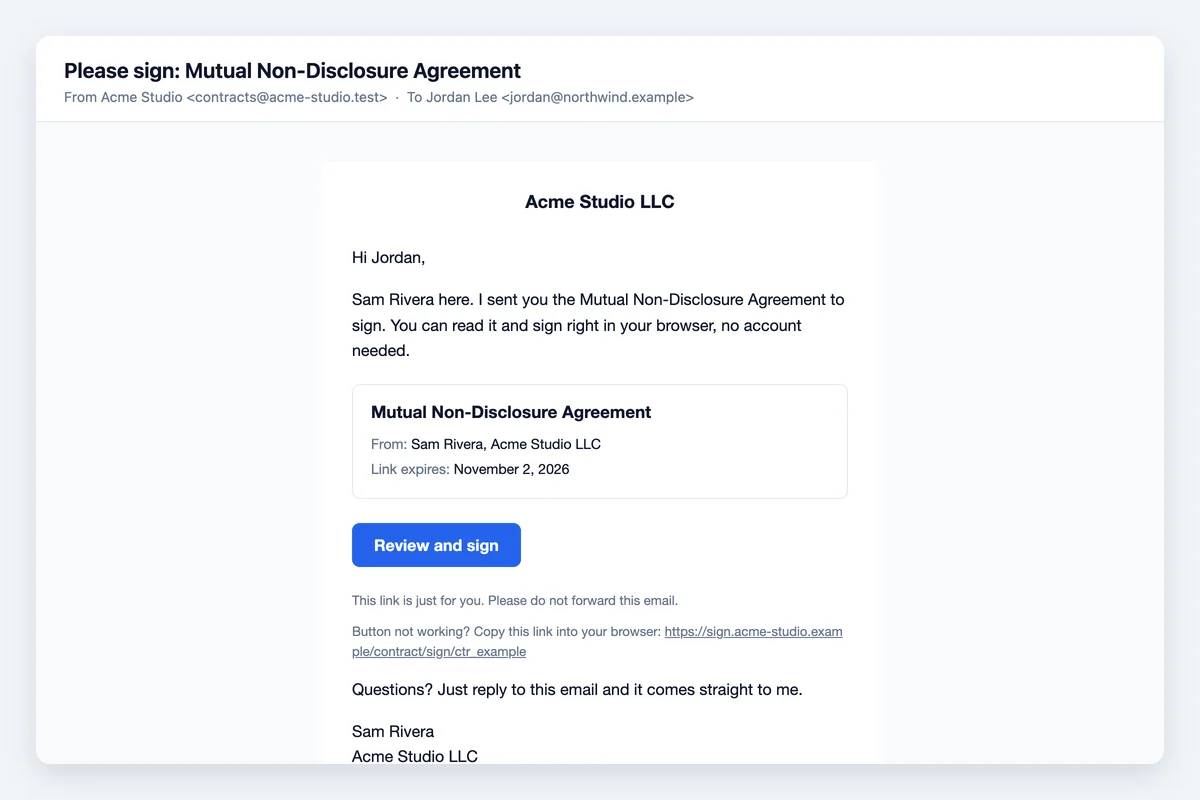
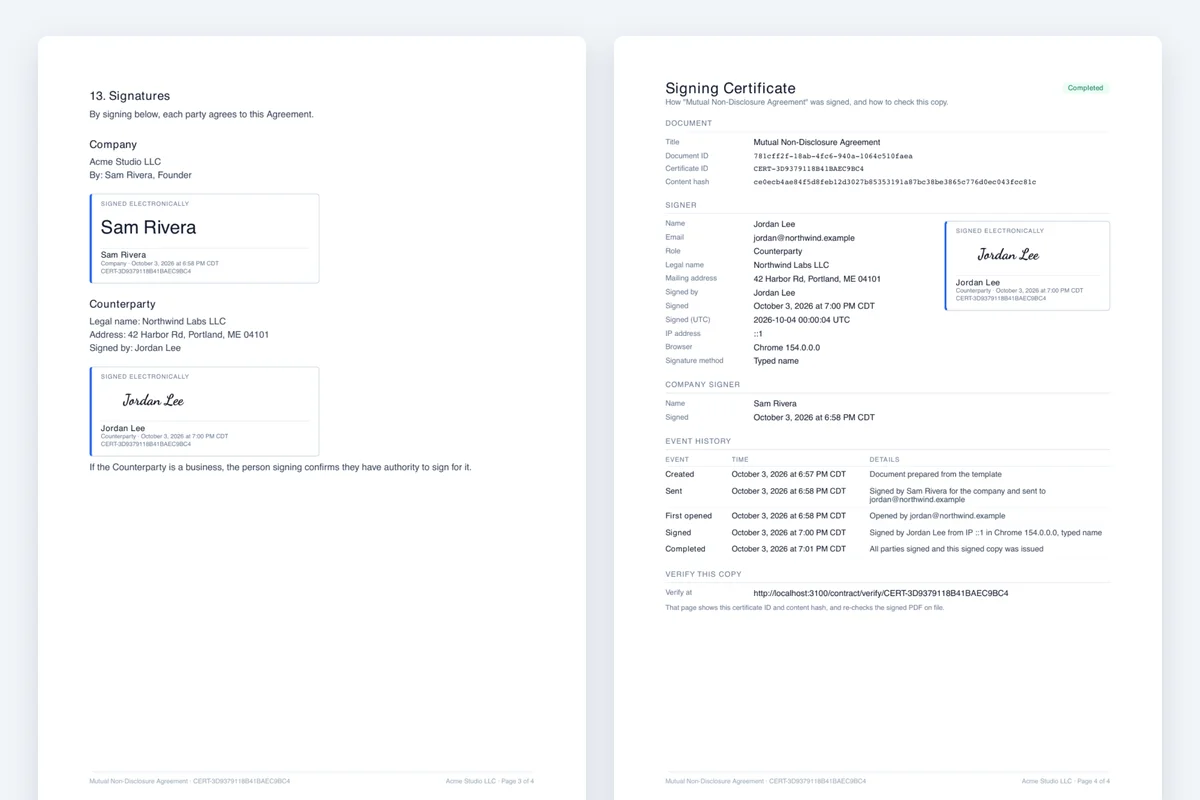
The link opens this page, where they fill in their details and sign:
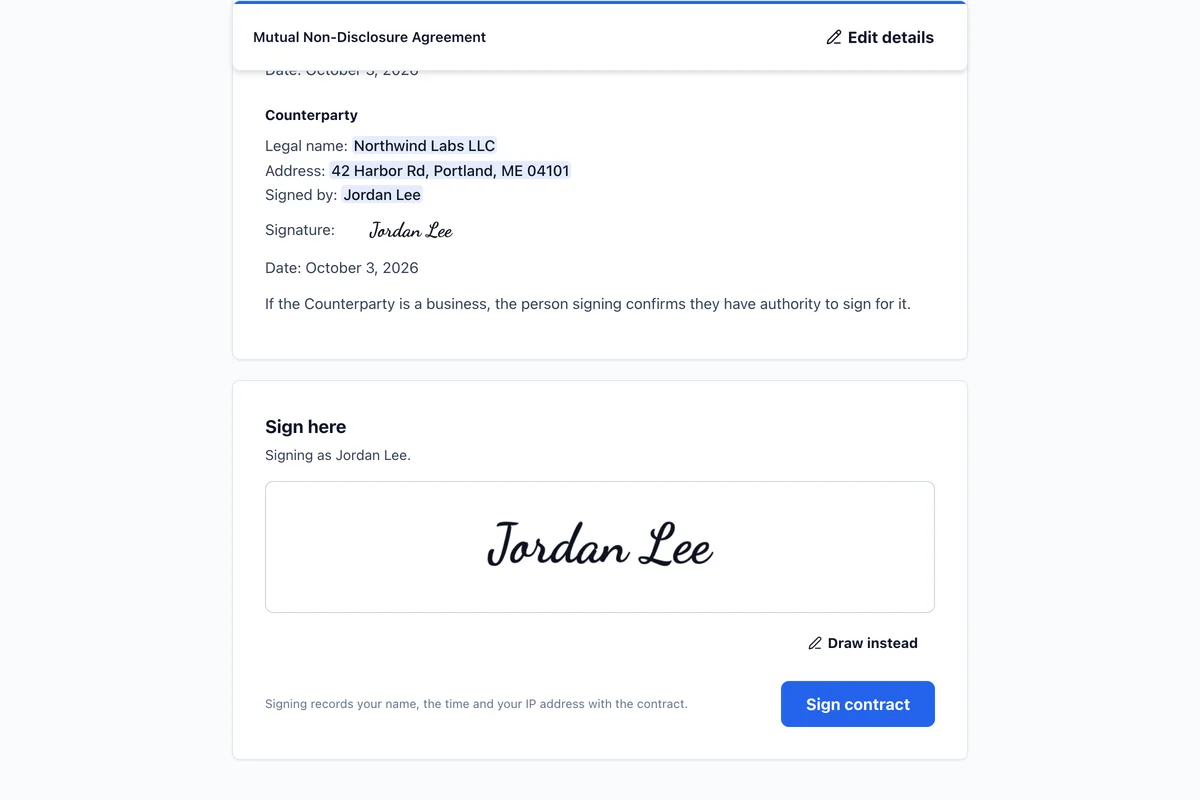
Once signed, both sides get the PDF with an audit certificate (signer, time, IP, document hash):
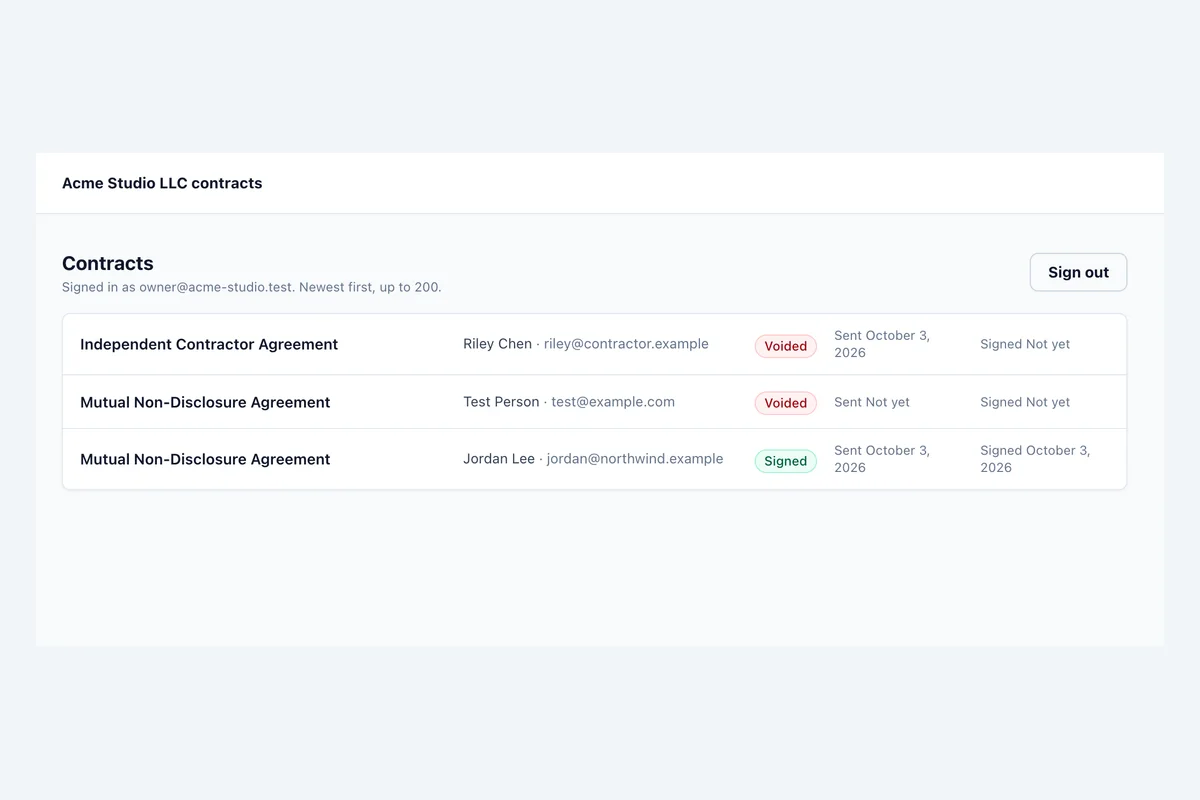
The owner can also see every contract in the web admin at `/admin`:
## Status
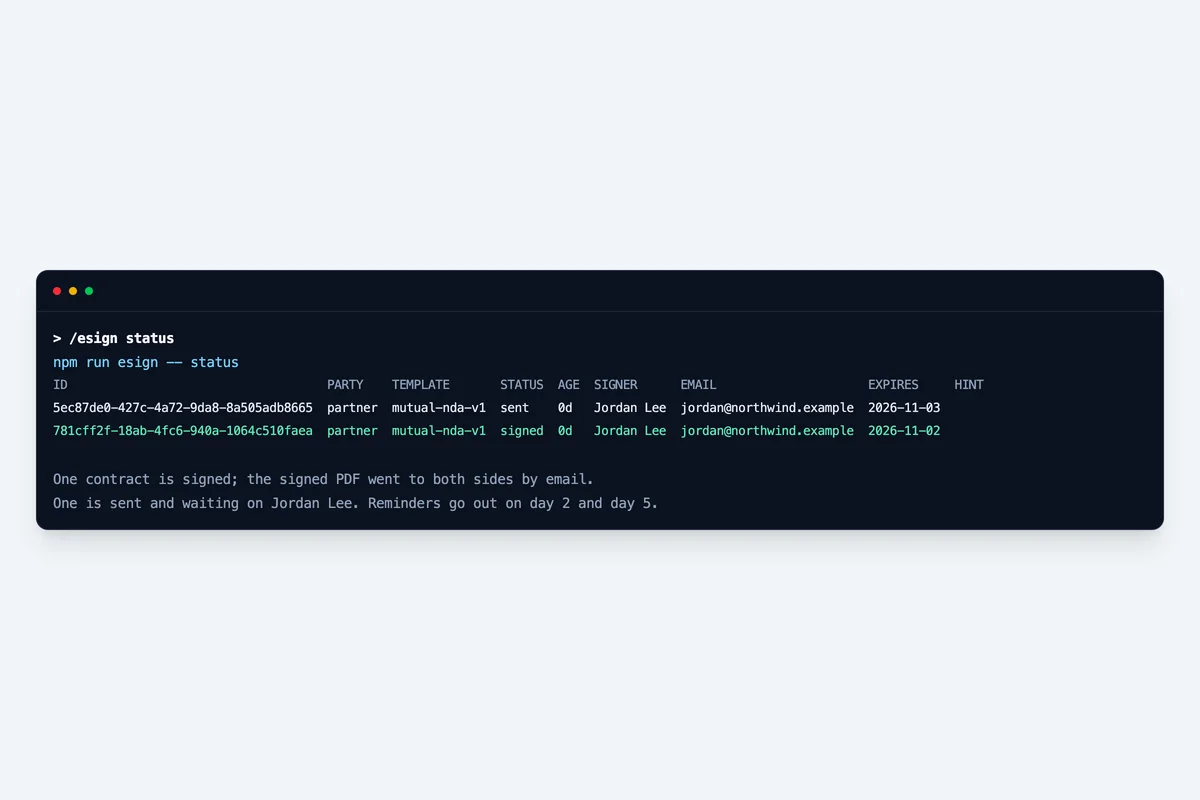
Run `npm run esign -- status`, adding `--party <type>` if the user named one and `--all` for void
and expired contracts too. Render the rows as a Markdown table in the reply. Explain the rows that
need action:
- `draft`: drafted, never emailed.
- `undelivered`: marked sent but no delivery recorded, usually a crash mid-send. Re-running `send`
re-sends the same link under the same delivery key, so the signer gets at most one email. It is
still an email to a person: ask first, as in step 5.
- `signed` with a `finalize:` hint: the PDF or the signed-copy emails failed. The daily cron
retries up to 5 times. Once the cause is fixed, `npm run esign -- finalize <id> --confirm <id>`
re-runs only the missing steps.
## Void
Run `status`, show the contract's row, then `AskUserQuestion`: "Void <title> for <signer>?" with
"Void" (the link shows a "voided" page from now on; this cannot be undone) and "Keep it". On
"Void": `npm run esign -- void <id> --confirm <id> --reason "<their reason>"`. Only a draft or sent
contract can be voided. An unsent draft being redrafted needs no question.
## Webhook (optional)
Set `ESIGN_WEBHOOK_URL` and `ESIGN_WEBHOOK_SECRET` (any long random string) to have the app POST
a `contract.signed` JSON event after each signature: contract id, template slug and version,
title, signer name and email, signed time and certificate id. Point it at a GoHighLevel Inbound
Webhook trigger, an n8n Webhook node or a Zapier Catch Hook to tag the contact, start onboarding
or post to Slack. A URL without a secret is refused, never sent unsigned.
Each request carries `x-esign-signature: sha256=<hex>`, the HMAC-SHA256 of the raw body keyed
with the secret. Verify it where the receiver can run code (an n8n Code node, your own endpoint):
```js
const crypto = require("node:crypto");
const expected = "sha256=" + crypto.createHmac("sha256", secret).update(rawBody).digest("hex");
const ok = expected.length === header.length && crypto.timingSafeEqual(Buffer.from(expected), Buffer.from(header));
```
Hash the body exactly as received, before any JSON parsing. A failed delivery is retried with the
other post-sign steps, so the same event can arrive twice: dedupe on the `x-esign-delivery`
header. Where the receiver cannot run code (Zapier, GoHighLevel), keep the URL private. The
payload never contains the signing link or the PDF.
## Web admin
`/admin` on the deployed app lists every contract with its status, events and signed PDF. Only
`CONTRACT_OWNER_EMAIL` can sign in, by an emailed login link. In Supabase, Authentication, URL
Configuration, set the Site URL to the production URL and add `<production URL>/auth/callback`
under Redirect URLs, or the login link will not return to the app. The admin
shows contracts and PDFs; drafting and sending stay in `/esign`.
## Customising templates
Templates are Markdown files in `src/content/contracts/` with YAML front matter:
```yaml
slug: consulting-v1 # must match the file name
version: "1.0"
title: Consulting Agreement
defaultPartyType: client # client | partner | employee
fields:
- key: effective_date # lowercase letters, digits and _
label: Effective date
filledBy: sender # sender (you) | signer (them)
type: date # text | date | address | list
required: true
maxLength: 200 # optional
```
The app refuses a template that breaks any of these rules, and `templates` prints why:
- Every `{{key}}` in the body is declared, and every declared field is used.
- `company_signature`, `company_signature_date`, `client_signature` and `client_signature_date`
are filled by the app. Never declare them. Each appears at most once, and a signature sits alone
on a plain line written exactly `Signature: {{company_signature}}`.
- A `list` field is sender-only and its `{{key}}` sits alone on its line.
- Headings, paragraphs and bullet or numbered lists only. No tables, no code blocks.
- Signer fields are text, date or address. Never collect a tax ID or bank details.
To change wording, copy the file to a new version (`-v2`) instead of editing it, so the template
behind an already signed contract stays readable. Drafts already made never change. Delete the
"Starter template" line only after a lawyer licensed in your state has reviewed the text.
Built by Jay FeldmanFounder, Lead Gen Jay · Inc. 5000 · 90K+ YouTube subs
This skill is free to install. The ones wearing a padlock are not, and they are where the heavier automations live. Membership opens all of them, plus weekly live coaching and the private community.